Gesture Smart RC Robot: Programmable Replay + USB
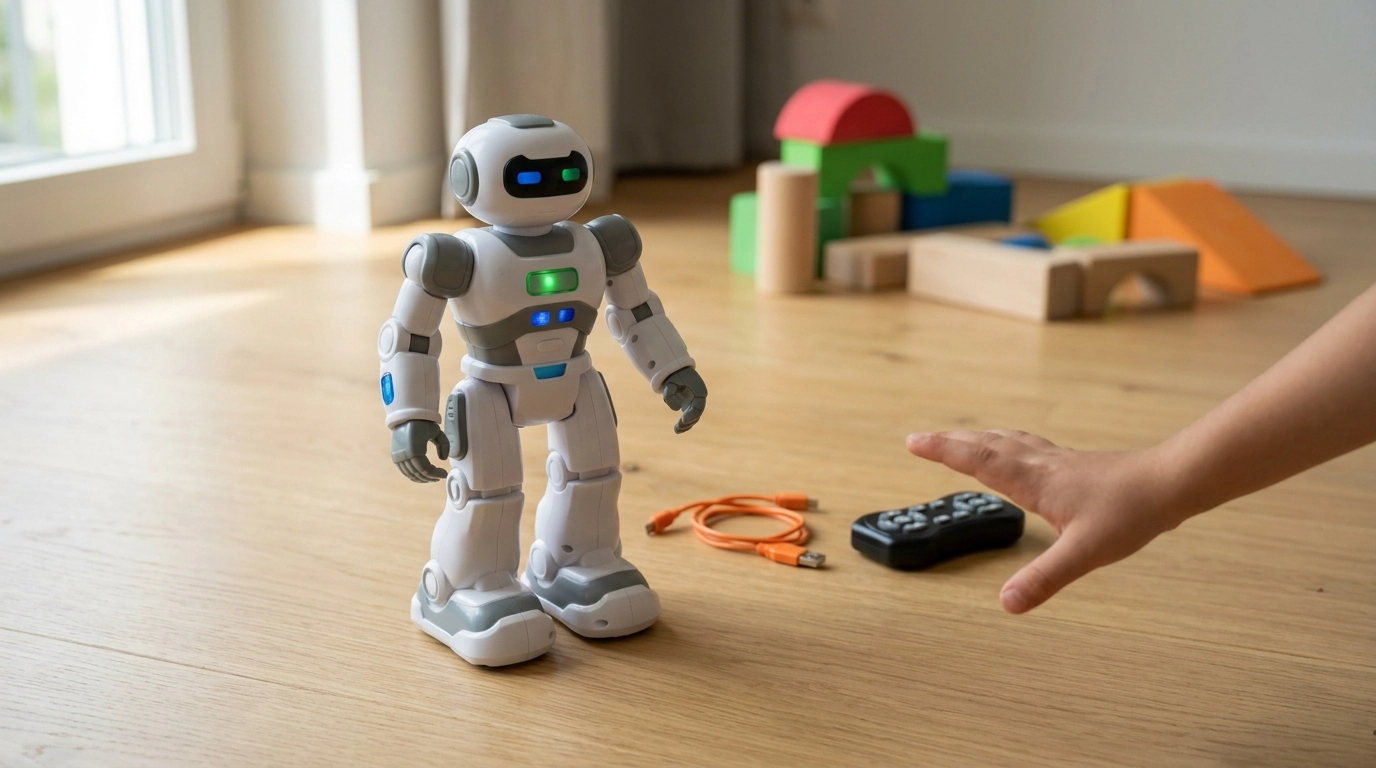
Gesture-Sensing Smart RC Robot Play: Big Interaction in a Small Space
A gesture-controlled RC robot brings hands-on fun to everyday play by turning simple hand motions into movement, plus adding light/sound effects and programmable “record and replay” action sequences. If you’re shopping for a toy that feels instantly interactive without the commitment of a full coding kit, a gesture-sensing robot is a strong middle ground—especially for indoor play on smooth, open floors.
For a ready-to-ship option, see the Gesture Sensing Smart RC Robot Toy with Programmable Features & USB Charging (in stock).
What This Smart RC Robot Does
Gesture-sensing RC robots are designed to feel “alive” the moment you start moving your hand. Instead of memorizing buttons, you guide the toy with intuitive motions, then switch to RC-style movement and pre-set routines when you want more structure.
- Responds to hand gestures for quick, intuitive control without complex setup
- Includes RC-style driving/movement for directional play and obstacle navigation
- Programmable features allow a sequence of actions (moves/turns) to be saved and replayed
- USB charging reduces disposable battery use and supports regular play sessions
- Designed for indoor-friendly fun on smooth floors, with better performance on clutter-free surfaces
Gesture Control vs. Traditional Remote Control
Both control styles can be fun, but they encourage different kinds of play. Gesture sensing typically rewards big, clear motions and quick experimentation, while button remotes tend to shine when you want more precise steering or longer-distance operation.
- Gesture control emphasizes fast learning and active play: move a hand to guide direction and actions
- Traditional remote control is often more precise for fine steering and longer-distance operation
- Gesture control is ideal for younger users who want instant interaction; remote controls can suit older kids who enjoy mastering buttons and modes
- Best results typically come from clear gestures, good lighting, and keeping the sensor area unobstructed
| Feature | Gesture Sensing | Button Remote Control |
|---|---|---|
| Learning curve | Fast and intuitive | Moderate; requires memorizing controls |
| Precision steering | Moderate | Often higher |
| Play style | Active, motion-based | Seated/handheld control |
| Setup & operation | Simple gestures; keep sensor clear | Simple; relies on buttons and range |
| Best for | Younger users and party play | Older users and skill-based driving |
Programmable Features: How “Record and Replay” Play Works
The programmable mode is where a smart RC robot starts to feel like a mini performance bot. Instead of reacting moment-to-moment, it can repeat a pattern you create—great for show-and-tell, challenges, and building simple sequencing skills.
- Programmable mode typically lets users input a series of actions (forward/back/turn/gesture-triggered moves) in a set order
- Encourages sequencing, planning, and cause-and-effect learning through play
- Great for creating mini “dance routines,” obstacle-course runs, or repeatable stunts
- For smoother results, build short sequences first, then expand and refine
A practical way to start: record a short sequence (a few moves and a turn), test it on an open patch of floor, then add steps once it consistently completes the routine without bumping into furniture.
USB Charging: What to Expect
USB rechargeable toys are designed for convenience—fewer battery swaps, more frequent short play sessions, and simpler storage. Charging habits also affect long-term performance, especially with rechargeable battery packs.
- Charge using a standard USB power source such as a computer USB port or a certified USB wall adapter
- Allow the robot to cool down after extended use before charging if it feels warm
- Charge on a non-flammable surface and avoid charging unattended for long periods
- If charging seems inconsistent, check cable fit, port debris, and try a different power source
For more safety guidance around toys and rechargeable batteries, review recommendations from the U.S. Consumer Product Safety Commission (CPSC) and general lithium battery handling tips from UL Solutions.
Setup Tips for Better Gesture Recognition
Gesture sensing works best when the robot can “see” what it’s supposed to interpret. Small environmental changes—like reflections or clutter—can make control feel jumpy, so a quick setup check can make play noticeably smoother.
Safety, Durability, and Age-Appropriate Play
Who This Robot Toy Makes Sense For
Product Details and At-a-Glance Highlights
If you want a straightforward, rechargeable gesture robot with programmable replay, the Gesture Sensing Smart RC Robot Toy with Programmable Features & USB Charging is in stock and priced for easy gifting.
| Item | Details |
|---|---|
| Product name | Gesture Sensing Smart RC Robot Toy with Programmable Features & USB Charging |
| Price | $35.51 USD |
| Availability | In stock |
| Charging | USB rechargeable |
| Core play modes | Gesture sensing + RC movement + programmable actions |
Related Picks for Hands-On Building and Play
- For kids who enjoy assembling and mechanical motion, try the Movable Steam Train, Car, Jeep 3D Puzzle Assembly Toy (in stock)
- Mixing a programmable robot with a 3D puzzle adds variety: perform routines, then build something that stays on a shelf
FAQ
How to charge the smart robot induction robot?
Turn the robot off, connect the included USB cable to the charging port, and plug the other end into a standard USB power source. Charge on a hard, non-flammable surface, and if charging is unreliable, reseat the cable, check the port for debris, or try a different adapter/cable.
What is an RC robot?
An RC robot is a remote-controlled robotic toy that moves and performs actions based on commands from a controller or built-in sensor system. Many include driving modes, lights/sounds, and sometimes programmable routines for repeatable moves.
How to make gesture control robot?
At a high level, a gesture-control robot combines sensors (such as an IMU, IR, ultrasonic, or a camera) with a microcontroller that interprets motion patterns and sends commands to the motors. The key is reliable gesture detection logic and safe power management so the robot responds consistently without overheating or draining too quickly.














Leave a comment